--- description: Debug your Search and Retrieval LLM workflows --- # Quickstart: Retrieval This quickstart shows how to start logging your retrievals from your vector datastore to Phoenix and run evaluations. ## Notebooks _Follow our tutorial in a notebook with our Langchain and LlamaIndex integrations_
FrameworkPhoenix InferencesPhoenix Traces & Spans
LangChainRetrieval Analyzer w/ Embeddings Open in ColabTraces and Spans Open in Colab
LlamaIndexRetrieval Analyzer w/ EmbeddingsOpen in ColabTraces and Spans Open in Colab
## Logging Retrievals to Phoenix (as Inferences)
#### Step 1: Logging Knowledge Base The first thing we need is to collect some sample from your vector store, to be able to compare against later. This is to able to see if some sections are not being retrieved, or some sections are getting a lot of traffic where you might want to beef up your context or documents in that area. For more details, visit this [page](../inferences/how-to-inferences/define-your-schema/corpus-data.md).
idtextembedding
1Voyager 2 is a spacecraft used by NASA to expl...[-0.02785328, -0.04709944, 0.042922903, 0.0559...
```python corpus_schema = px.Schema( id_column_name="id", document_column_names=EmbeddingColumnNames( vector_column_name="embedding", raw_data_column_name="text", ), ) ``` #### Step 2: Logging Retrieval and Response We also will be logging the prompt/response pairs from the deployed application. For more details, visit this [page](../inferences/how-to-inferences/define-your-schema/retrieval-rag.md).
queryembeddingretrieved_document_idsrelevance_scoresresponse
who was the first person that walked on the moon[-0.0126, 0.0039, 0.0217, ...[7395, 567965, 323794, ...[11.30, 7.67, 5.85, ...Neil Armstrong
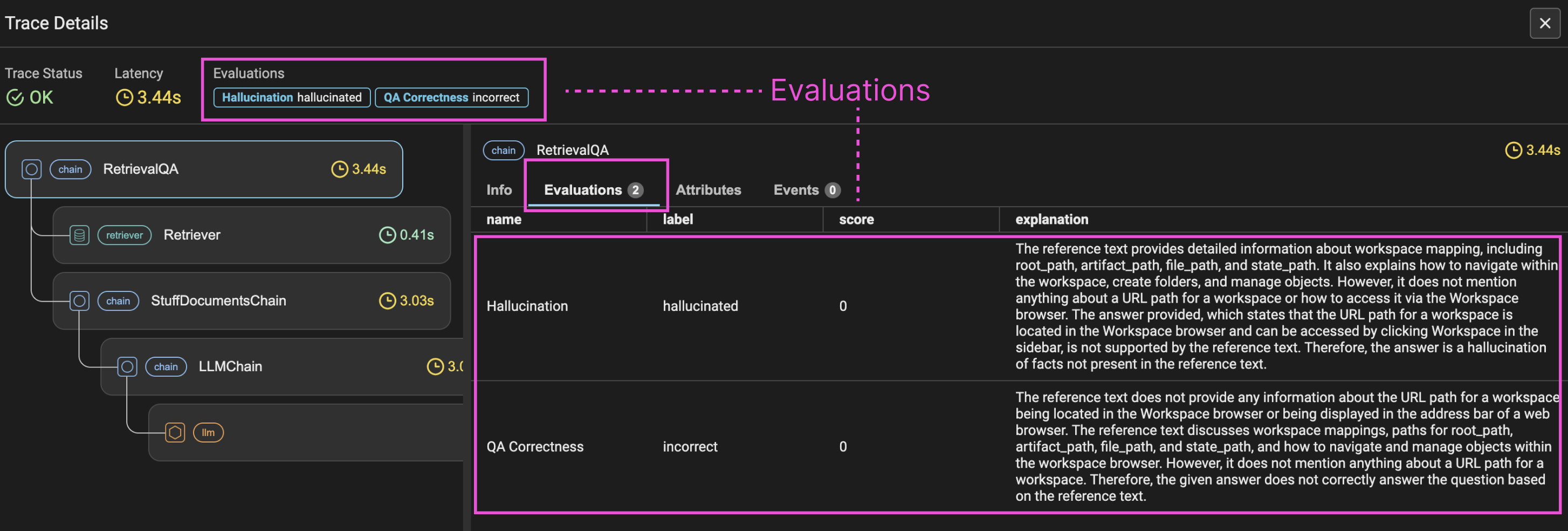
```python primary_schema = Schema( prediction_id_column_name="id", prompt_column_names=RetrievalEmbeddingColumnNames( vector_column_name="embedding", raw_data_column_name="query", context_retrieval_ids_column_name="retrieved_document_ids", context_retrieval_scores_column_name="relevance_scores", ) response_column_names="response", ) ``` ### Running Evaluations on your Retrievals In order to run retrieval Evals the following code can be used for quick analysis of common frameworks of LangChain and LlamaIndex. Independent of the framework you are instrumenting, Phoenix traces allow you to get retrieval data in a common dataframe format that follows the [OpenInference](../reference/open-inference.md) specification. ```python # Get traces from Phoenix into dataframe spans_df = px.active_session().get_spans_dataframe() spans_df[["name", "span_kind", "attributes.input.value", "attributes.retrieval.documents"]].head() from phoenix.session.evaluation import get_qa_with_reference, get_retrieved_documents retrieved_documents_df = get_retrieved_documents(px.active_session()) queries_df = get_qa_with_reference(px.active_session()) ``` Once the data is in a dataframe, evaluations can be run on the data. Evaluations can be run on on different spans of data. In the below example we run on the top level spans that represent a single trace. ### Q\&A and Hallucination Evals This example shows how to run Q\&A and Hallucnation Evals with OpenAI (many other [models](../api/evaluation-models.md) are available including Anthropic, Mixtral/Mistral, Gemini, OpenAI Azure, Bedrock, etc...) ```python from phoenix.trace import SpanEvaluations, DocumentEvaluations from phoenix.evals import ( HALLUCINATION_PROMPT_RAILS_MAP, HALLUCINATION_PROMPT_TEMPLATE, QA_PROMPT_RAILS_MAP, QA_PROMPT_TEMPLATE, OpenAIModel, llm_classify, ) # Creating Hallucination Eval which checks if the application hallucinated hallucination_eval = llm_classify( dataframe=queries_df, model=OpenAIModel("gpt-4-turbo-preview", temperature=0.0), template=HALLUCINATION_PROMPT_TEMPLATE, rails=list(HALLUCINATION_PROMPT_RAILS_MAP.values()), provide_explanation=True, # Makes the LLM explain its reasoning concurrency=4, ) hallucination_eval["score"] = ( hallucination_eval.label[~hallucination_eval.label.isna()] == "factual" ).astype(int) # Creating Q&A Eval which checks if the application answered the question correctly qa_correctness_eval = llm_classify( dataframe=queries_df, model=OpenAIModel("gpt-4-turbo-preview", temperature=0.0), template=QA_PROMPT_TEMPLATE, rails=list(QA_PROMPT_RAILS_MAP.values()), provide_explanation=True, # Makes the LLM explain its reasoning concurrency=4, ) qa_correctness_eval["score"] = ( hallucination_eval.label[~qa_correctness_eval.label.isna()] == "correct" ).astype(int) # Logs the Evaluations back to the Phoenix User Interface (Optional) px.Client().log_evaluations( SpanEvaluations(eval_name="Hallucination", dataframe=hallucination_eval), SpanEvaluations(eval_name="QA Correctness", dataframe=qa_correctness_eval), ) ``` The Evals are available in dataframe locally and can be materilazed back to the Phoenix UI, the Evals are attached to the referenced SpanIDs.

Evals in Phoenix UI

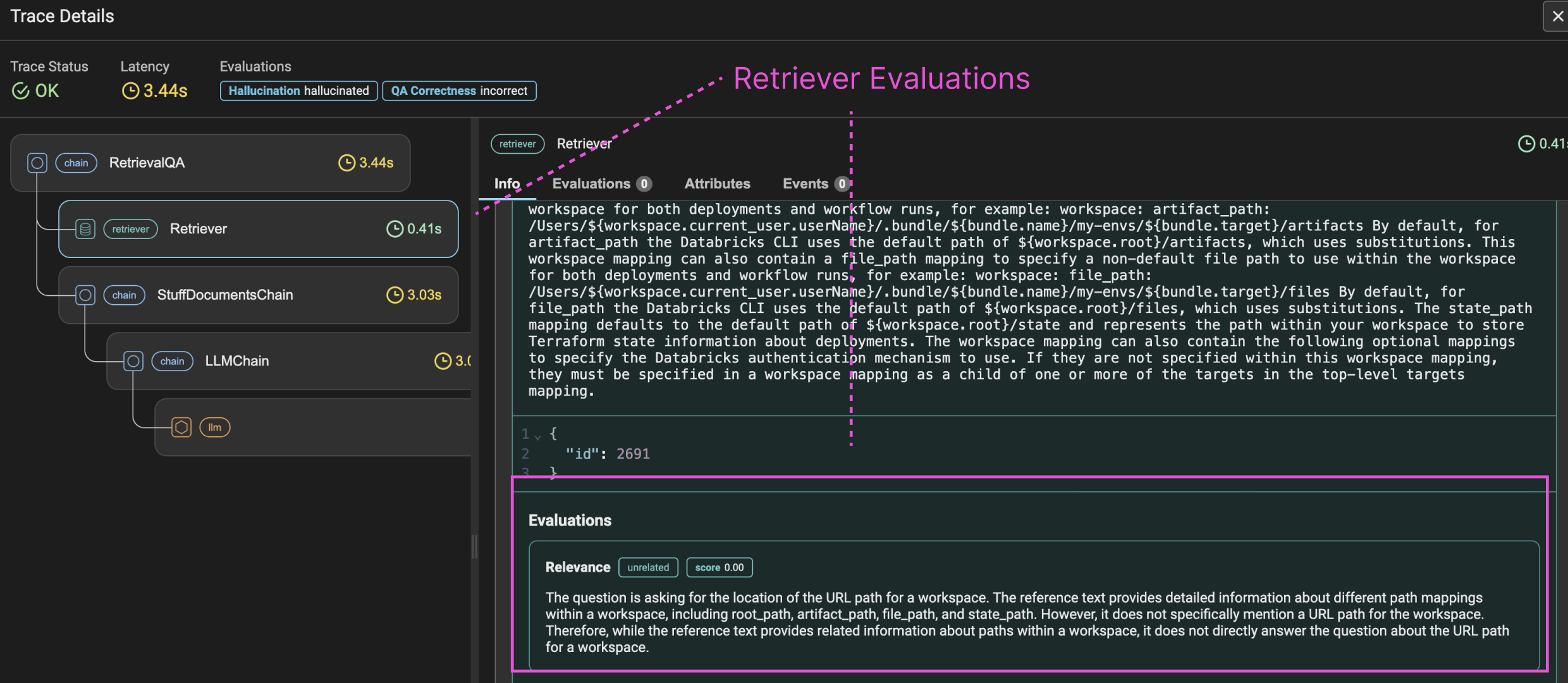
The snipit of code above links the Evals back to the spans they were generated against. ### Retrieval Chunk Evals [Retrieval Evals](../evaluation/how-to-evals/running-pre-tested-evals/retrieval-rag-relevance.md) are run on the individual chunks returned on retrieval. In addition to calculating chunk level metrics, Phoenix also calculates MRR and NDCG for the retrieved span. ```python from phoenix.evals import ( RAG_RELEVANCY_PROMPT_RAILS_MAP, RAG_RELEVANCY_PROMPT_TEMPLATE, OpenAIModel, llm_classify, ) retrieved_documents_eval = llm_classify( dataframe=retrieved_documents_df, model=OpenAIModel("gpt-4-turbo-preview", temperature=0.0), template=RAG_RELEVANCY_PROMPT_TEMPLATE, rails=list(RAG_RELEVANCY_PROMPT_RAILS_MAP.values()), provide_explanation=True, ) retrieved_documents_eval["score"] = ( retrieved_documents_eval.label[~retrieved_documents_eval.label.isna()] == "relevant" ).astype(int) px.Client().log_evaluations(DocumentEvaluations(eval_name="Relevance", dataframe=retrieved_documents_eval)) ``` The calculation is done using the LLM Eval on all chunks returned for the span and the log\_evaluations connects the Evals back to the original spans.

Retrieval Evals