# Capture Feedback
{% hint style="info" %}
feedback and annotations are available for arize-phoenix>=4.20.0
{% endhint %}
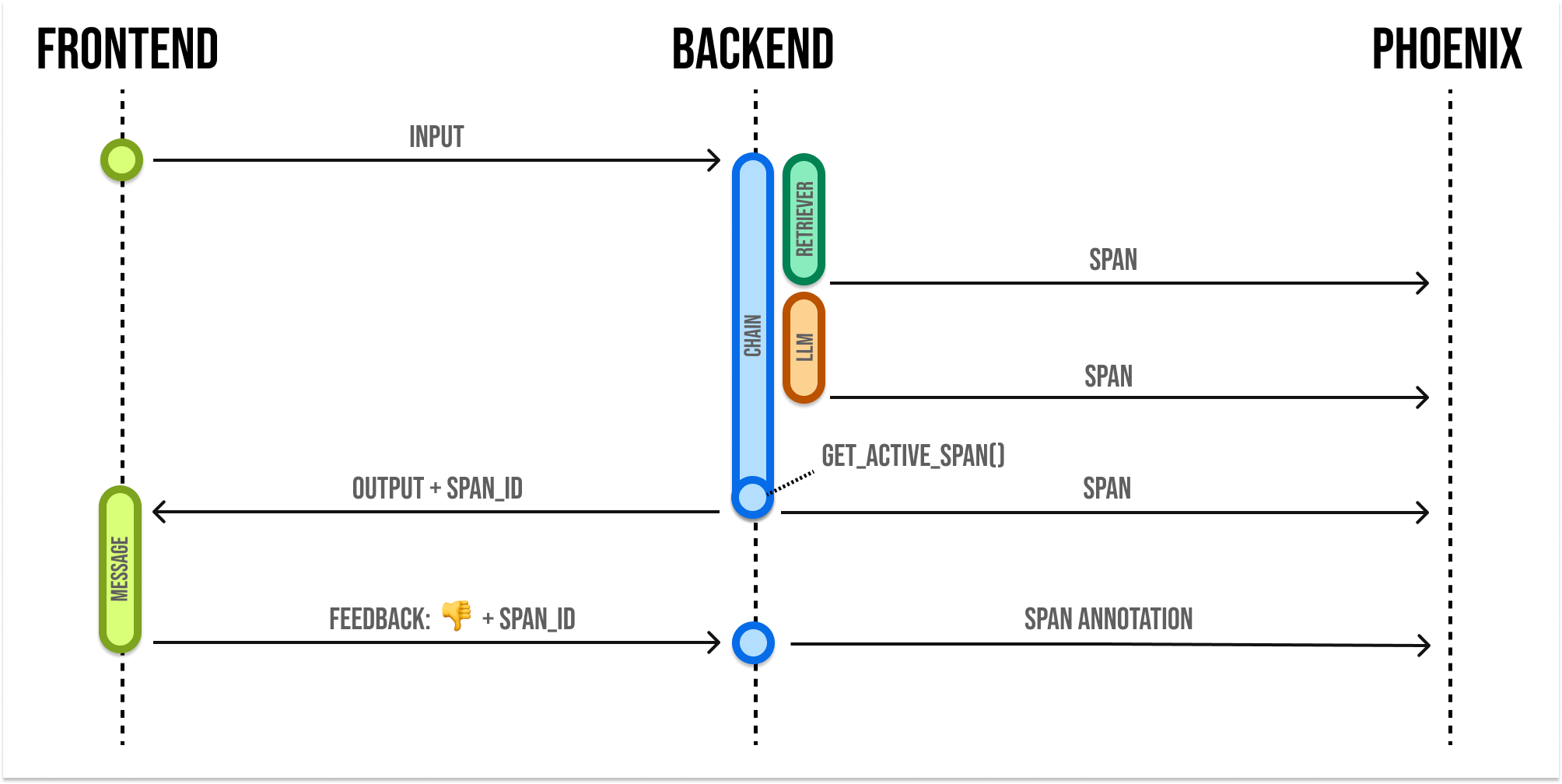
When building LLM applications, it is important to collect feedback to understand how your app is performing in production. The ability to observe user feedback along with traces can be very powerful as it allows you to drill down into the most interesting examples. Once you have identified these example, you can share them for further review, automatic evaluation, or fine-tuning.
Phoenix lets you attach user feedback to spans and traces in the form of annotations. It's helpful to expose a simple mechanism (such as 👍👎) to collect user feedback in your app. You can then use the Phoenix API to attach feedback to a span.
Phoenix expects feedback to be in the form of an **annotation.** Annotations consist of these fields:
```json
{
"span_id": "67f6740bbe1ddc3f", // the id of the span to annotate
"name": "correctness", // the name of your annotator
"annotator_kind": "HUMAN", // HUMAN or LLM
"result": {
"label": "correct", // A human-readable category for the feedback
"score": 1, // a numeric score, can be 0 or 1, or a range like 0 to 100
"explanation": "The response answered the question I asked"
}
}
```
Note that you can provide a **label**, a **score**, or both. With Phoenix an annotation has a name (like **correctness**), is associated with an **annotator** (either an **LLM** or a **HUMAN**) and can be attached to the **spans** you have logged to Phoenix.
## Send Annotations to Phoenix
\
Once you construct the annotation, you can send this to Phoenix via it's REST API. You can POST an annotation from your application to `/v1/span_annotations` like so:
{% hint style="info" %}
If you're self-hosting Phoenix, be sure to change the endpoint in the code below to `/v1/span_annotations?sync=false`
{% endhint %}
{% tabs %}
{% tab title="Python" %}
**Retrieve the current span\_id**
If you'd like to collect feedback on currently instrumented code, you can get the current span using the `opentelemetry` SDK.
```python
from opentelemetry.trace import format_span_id, get_current_span
span = get_current_span()
span_id = format_span_id(span.get_span_context().span_id)
```
For LangChain, import `get_current_span` from our instrumentation library instead.
```python
from opentelemetry.trace import format_span_id
from openinference.instrumentation.langchain import get_current_span
span = get_current_span()
if span is not None:
span_id = format_span_id(span.get_span_context().span_id)
```
You can use the span\_id to send an annotation associated with that span.
```python
import httpx
client = httpx.Client()
annotation_payload = {
"data": [
{
"span_id": span_id,
"name": "user feedback",
"annotator_kind": "HUMAN",
"result": {"label": "thumbs-up", "score": 1},
"metadata": {},
}
]
}
headers = {'api_key': ''}
client.post(
"https://app.phoenix.arize.com/v1/span_annotations?sync=false",
json=annotation_payload,
headers=headers
)
```
{% endtab %}
{% tab title="TypeScript" %}
**Retrieve the current spanId**
```typescript
import { trace } from "@opentelemetry/api";
async function chat(req, res) {
// ...
const spanId = trace.getActiveSpan()?.spanContext().spanId;
}
```
You can use the spanId to send an annotation associated with that span.
```typescript
async function postFeedback(spanId: string) {
// ...
await fetch("https://app.phoenix.arize.com/v1/span_annotations?sync=false", {
method: "POST",
headers: {
"Content-Type": "application/json",
accept: "application/json",
"api_key": ",
},
body: JSON.stringify({
data: [
{
span_id: spanId,
annotator_kind: "HUMAN",
name: "feedback",
result: {
label: "thumbs_up",
score: 1,
explanation: "A good response",
},
},
],
}),
});
}
```
{% endtab %}
{% tab title="curl" %}
```bash
curl -X 'POST' \
'https://app.phoenix.arize.com/v1/span_annotations?sync=false' \
-H 'accept: application/json' \
-H 'Content-Type: application/json' \
-H 'api_key: \
-d '{
"data": [
{
"span_id": "67f6740bbe1ddc3f",
"name": "correctness",
"annotator_kind": "HUMAN",
"result": {
"label": "correct",
"score": 1,
"explanation": "it is correct"
},
"metadata": {}
}
]
}'
```
{% endtab %}
{% endtabs %}
## Annotate Traces in the UI
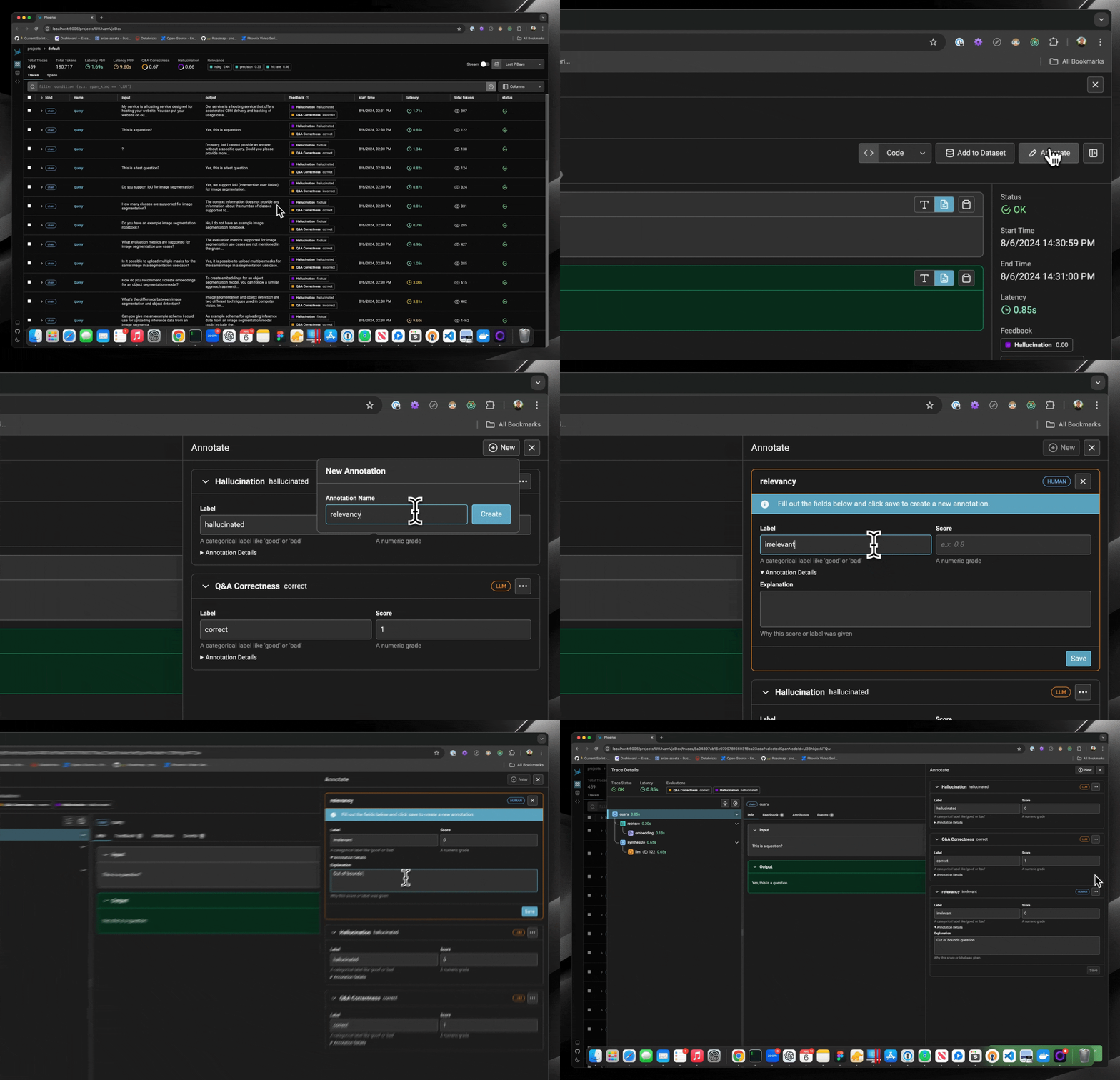
Phoenix also allows you to manually annotate traces with feedback within the application. This can be useful for adding context to a trace, such as a user's comment or a note about a specific issue. You can annotate a span directly from the span details view.
{% embed url="https://www.youtube.com/watch?t=1s&v=20U6INQJyyU" %}