\n",
"  \n",
"
\n",
"
\n",
" Docs\n",
" |\n",
" GitHub\n",
" |\n",
" Community\n",
"
\n",
" \n",
"
\n",
" Docs\n",
" |\n",
" GitHub\n",
" |\n",
" Community\n",
"
 "
]
},
{
"cell_type": "code",
"execution_count": null,
"metadata": {},
"outputs": [],
"source": [
"print(f\"🚀 Open the Phoenix UI if you haven't already: {session.url}\")"
]
},
{
"cell_type": "markdown",
"metadata": {},
"source": [
"## 6. Export and Evaluate Your Trace Data\n",
"\n",
"You can export your trace data as a pandas dataframe for further analysis and evaluation.\n",
"\n",
"In this case, we will export our `retriever` spans into two separate dataframes:\n",
"- `queries_df`, in which the retrieved documents for each query are concatenated into a single column,\n",
"- `retrieved_documents_df`, in which each retrieved document is \"exploded\" into its own row to enable the evaluation of each query-document pair in isolation.\n",
"\n",
"This will enable us to compute multiple kinds of evaluations, including:\n",
"- relevance: Are the retrieved documents grounded in the response?\n",
"- Q&A correctness: Are your application's responses grounded in the retrieved context?\n",
"- hallucinations: Is your application making up false information?"
]
},
{
"cell_type": "code",
"execution_count": null,
"metadata": {},
"outputs": [],
"source": [
"queries_df = get_qa_with_reference(px.Client())\n",
"retrieved_documents_df = get_retrieved_documents(px.Client())"
]
},
{
"cell_type": "markdown",
"metadata": {},
"source": [
"Next, define your evaluation model and your evaluators.\n",
"\n",
"Evaluators are built on top of language models and prompt the LLM to assess the quality of responses, the relevance of retrieved documents, etc., and provide a quality signal even in the absence of human-labeled data. Pick an evaluator type and instantiate it with the language model you want to use to perform evaluations using our battle-tested evaluation templates."
]
},
{
"cell_type": "code",
"execution_count": null,
"metadata": {},
"outputs": [],
"source": [
"eval_model = OpenAIModel(\n",
" model=\"gpt-4o\",\n",
")\n",
"hallucination_evaluator = HallucinationEvaluator(eval_model)\n",
"qa_correctness_evaluator = QAEvaluator(eval_model)\n",
"relevance_evaluator = RelevanceEvaluator(eval_model)\n",
"\n",
"hallucination_eval_df, qa_correctness_eval_df = run_evals(\n",
" dataframe=queries_df,\n",
" evaluators=[hallucination_evaluator, qa_correctness_evaluator],\n",
" provide_explanation=True,\n",
")\n",
"relevance_eval_df = run_evals(\n",
" dataframe=retrieved_documents_df,\n",
" evaluators=[relevance_evaluator],\n",
" provide_explanation=True,\n",
")[0]\n",
"\n",
"px.Client().log_evaluations(\n",
" SpanEvaluations(eval_name=\"Hallucination\", dataframe=hallucination_eval_df),\n",
" SpanEvaluations(eval_name=\"QA Correctness\", dataframe=qa_correctness_eval_df),\n",
" DocumentEvaluations(eval_name=\"Relevance\", dataframe=relevance_eval_df),\n",
")"
]
},
{
"cell_type": "markdown",
"metadata": {},
"source": [
"Your evaluations should now appear as annotations on the appropriate spans in Phoenix.\n",
"\n",
"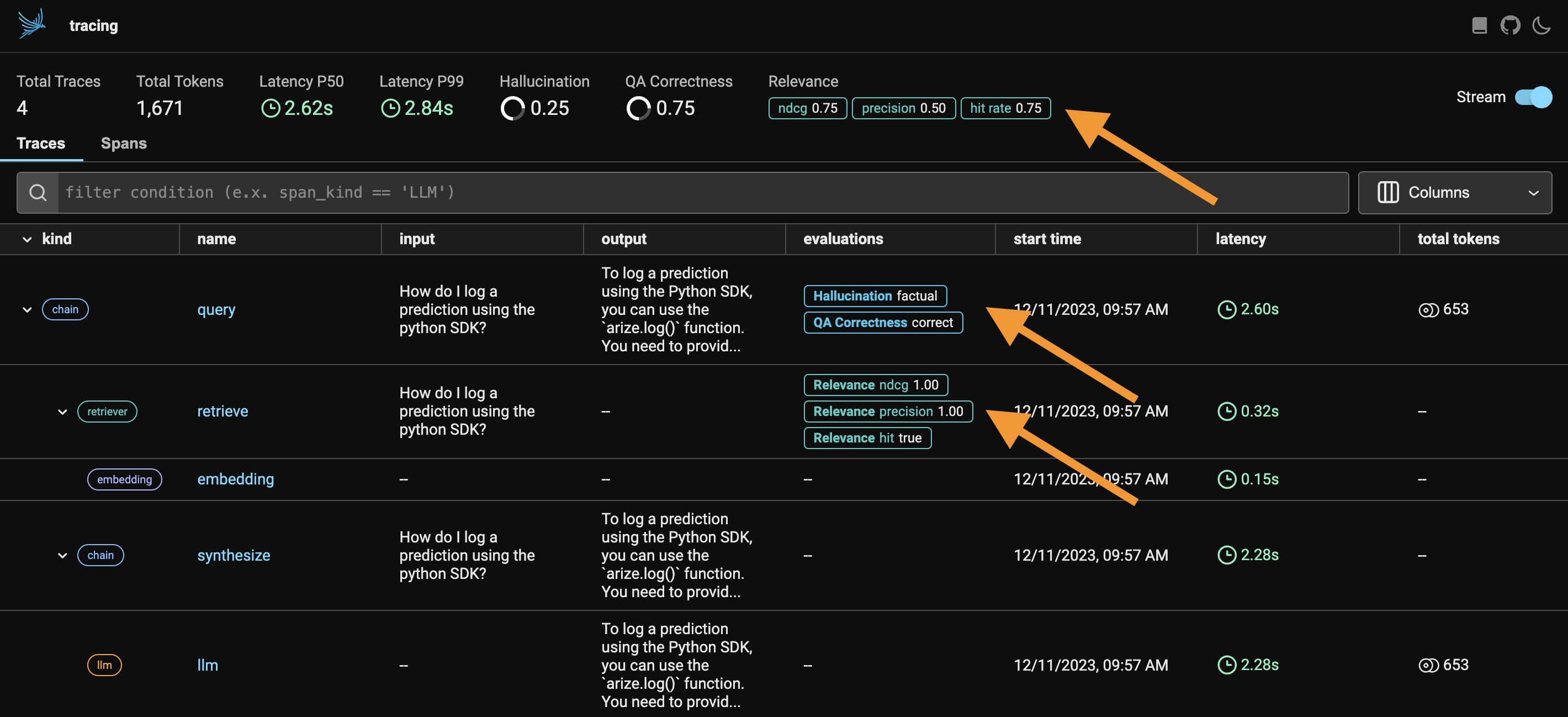"
]
},
{
"cell_type": "code",
"execution_count": null,
"metadata": {},
"outputs": [],
"source": [
"print(f\"🚀 Open the Phoenix UI if you haven't already: {session.url}\")"
]
},
{
"cell_type": "markdown",
"metadata": {},
"source": [
"## 7. Final Thoughts\n",
"\n",
"LLM Traces and the accompanying OpenInference Tracing specification is designed to be a category of telemetry data that is used to understand the execution of LLMs and the surrounding application context such as retrieval from vector stores and the usage of external tools such as search engines or APIs. It lets you understand the inner workings of the individual steps your application takes wile also giving you visibility into how your system is running and performing as a whole. \n",
"\n",
"LLM Evals are designed for simple, fast, and accurate LLM-based evaluations. They let you quickly benchmark the performance of your LLM application and help you identify the problematic spans of execution.\n",
"\n",
"For more details on Phoenix, LLM Tracing, and LLM Evals, checkout our [documentation](https://docs.arize.com/phoenix/)."
]
}
],
"metadata": {
"language_info": {
"name": "python"
}
},
"nbformat": 4,
"nbformat_minor": 4
}
"
]
},
{
"cell_type": "code",
"execution_count": null,
"metadata": {},
"outputs": [],
"source": [
"print(f\"🚀 Open the Phoenix UI if you haven't already: {session.url}\")"
]
},
{
"cell_type": "markdown",
"metadata": {},
"source": [
"## 6. Export and Evaluate Your Trace Data\n",
"\n",
"You can export your trace data as a pandas dataframe for further analysis and evaluation.\n",
"\n",
"In this case, we will export our `retriever` spans into two separate dataframes:\n",
"- `queries_df`, in which the retrieved documents for each query are concatenated into a single column,\n",
"- `retrieved_documents_df`, in which each retrieved document is \"exploded\" into its own row to enable the evaluation of each query-document pair in isolation.\n",
"\n",
"This will enable us to compute multiple kinds of evaluations, including:\n",
"- relevance: Are the retrieved documents grounded in the response?\n",
"- Q&A correctness: Are your application's responses grounded in the retrieved context?\n",
"- hallucinations: Is your application making up false information?"
]
},
{
"cell_type": "code",
"execution_count": null,
"metadata": {},
"outputs": [],
"source": [
"queries_df = get_qa_with_reference(px.Client())\n",
"retrieved_documents_df = get_retrieved_documents(px.Client())"
]
},
{
"cell_type": "markdown",
"metadata": {},
"source": [
"Next, define your evaluation model and your evaluators.\n",
"\n",
"Evaluators are built on top of language models and prompt the LLM to assess the quality of responses, the relevance of retrieved documents, etc., and provide a quality signal even in the absence of human-labeled data. Pick an evaluator type and instantiate it with the language model you want to use to perform evaluations using our battle-tested evaluation templates."
]
},
{
"cell_type": "code",
"execution_count": null,
"metadata": {},
"outputs": [],
"source": [
"eval_model = OpenAIModel(\n",
" model=\"gpt-4o\",\n",
")\n",
"hallucination_evaluator = HallucinationEvaluator(eval_model)\n",
"qa_correctness_evaluator = QAEvaluator(eval_model)\n",
"relevance_evaluator = RelevanceEvaluator(eval_model)\n",
"\n",
"hallucination_eval_df, qa_correctness_eval_df = run_evals(\n",
" dataframe=queries_df,\n",
" evaluators=[hallucination_evaluator, qa_correctness_evaluator],\n",
" provide_explanation=True,\n",
")\n",
"relevance_eval_df = run_evals(\n",
" dataframe=retrieved_documents_df,\n",
" evaluators=[relevance_evaluator],\n",
" provide_explanation=True,\n",
")[0]\n",
"\n",
"px.Client().log_evaluations(\n",
" SpanEvaluations(eval_name=\"Hallucination\", dataframe=hallucination_eval_df),\n",
" SpanEvaluations(eval_name=\"QA Correctness\", dataframe=qa_correctness_eval_df),\n",
" DocumentEvaluations(eval_name=\"Relevance\", dataframe=relevance_eval_df),\n",
")"
]
},
{
"cell_type": "markdown",
"metadata": {},
"source": [
"Your evaluations should now appear as annotations on the appropriate spans in Phoenix.\n",
"\n",
""
]
},
{
"cell_type": "code",
"execution_count": null,
"metadata": {},
"outputs": [],
"source": [
"print(f\"🚀 Open the Phoenix UI if you haven't already: {session.url}\")"
]
},
{
"cell_type": "markdown",
"metadata": {},
"source": [
"## 7. Final Thoughts\n",
"\n",
"LLM Traces and the accompanying OpenInference Tracing specification is designed to be a category of telemetry data that is used to understand the execution of LLMs and the surrounding application context such as retrieval from vector stores and the usage of external tools such as search engines or APIs. It lets you understand the inner workings of the individual steps your application takes wile also giving you visibility into how your system is running and performing as a whole. \n",
"\n",
"LLM Evals are designed for simple, fast, and accurate LLM-based evaluations. They let you quickly benchmark the performance of your LLM application and help you identify the problematic spans of execution.\n",
"\n",
"For more details on Phoenix, LLM Tracing, and LLM Evals, checkout our [documentation](https://docs.arize.com/phoenix/)."
]
}
],
"metadata": {
"language_info": {
"name": "python"
}
},
"nbformat": 4,
"nbformat_minor": 4
}